
Choose how you want to
use
FlashAlpha.
billed annually ($2,868/yr)
- 2,500 requests/day
- 15-second freshness - near-live data
- Full-chain GEX (docs) - all expirations aggregated
- 0DTE analytics (docs) - pin risk, expected move, gamma regime
- Flow Analytics (docs) - simulation-aware GEX/DEX/levels/pin-risk/dealer-risk recomputed on intraday effective OI
- Options chain (docs) with full Greeks & IV
- Volatility analytics (docs) - realized vol, skew, term structure
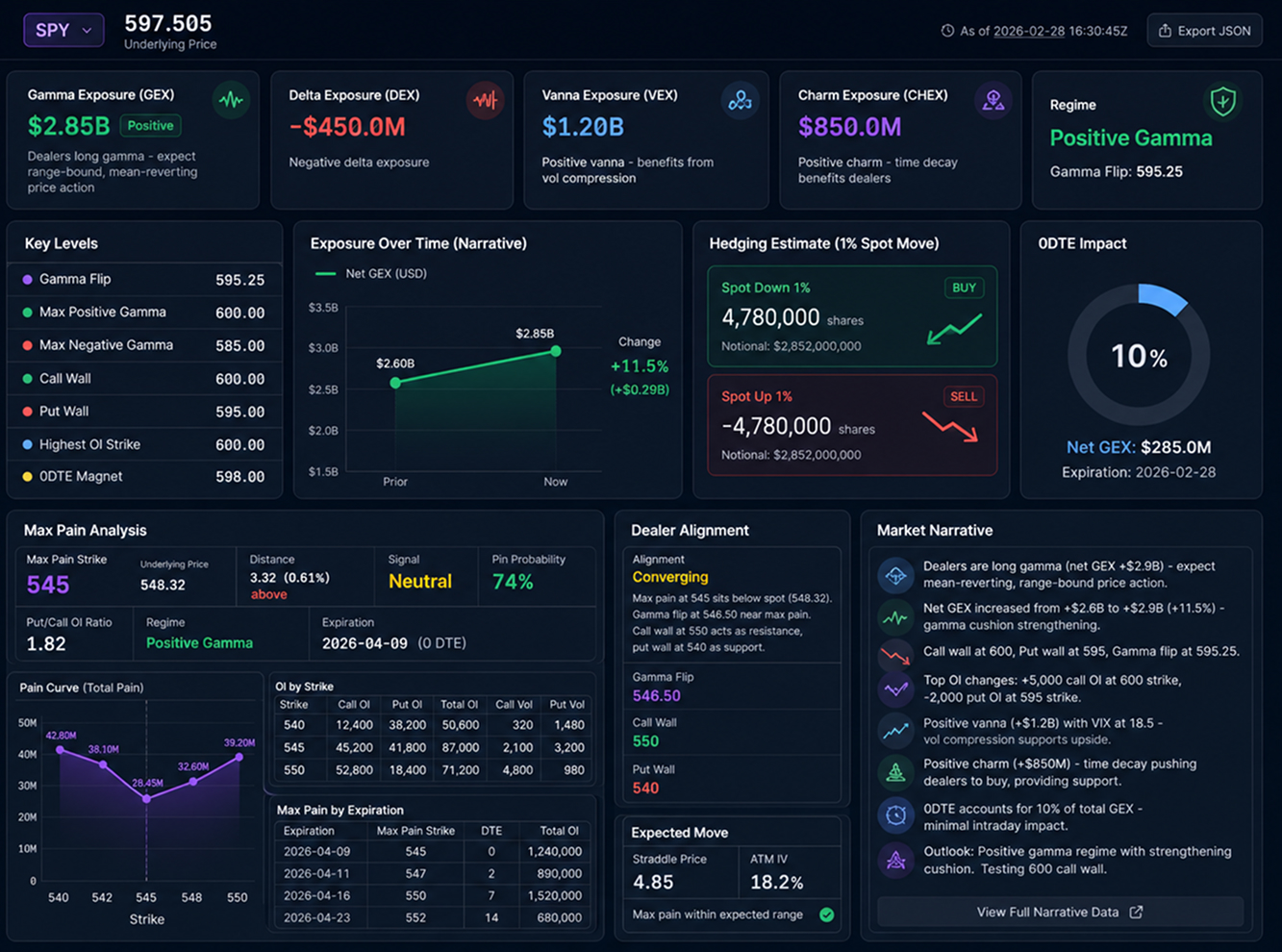
- AI narrative (docs) - verbal exposure analysis
- Kelly criterion position sizing
- Extended Market Overview - full-chain exposure, VRP, term structure, advanced vol sections
- Live Screener (docs) - 20-symbol Tier 1 universe, filter trees, cascading expiry/strike/contract filters
- Priority email support
billed annually ($14,388/yr)
- Everything in Growth
- Unlimited requests - no daily cap
- Live Screener (full) (docs) - ~250 symbols, formulas, strategy scores (harvest, dealer-flow-risk, iron-condor)
- Backtest to the minute since 2017 (Historical API) - replay GEX, VRP, dealer regime & max pain at any minute; no lookahead; same response shape as live
- VRP analytics (docs) - z-score, regime, strategy scores, directional decomposition
- SVI vol surfaces (docs) - calibrated parameters, arbitrage detection, variance swaps
- Higher-order Greeks (docs) - vanna, charm, volga, speed surfaces
- No cache - real-time data, fresh on every request
-
SVI-smoothed IV on every option quote (
svi_vol) -
OI simulator state + Flow bundle (docs) - unclamped simulated OI, effective OI per contract, one-call
/v1/flow/live -
Flow polarity (guide) -
?polarity=flowsigns GEX & levels by the session dealer-inventory change from the tape (structural vs flow) - Unusual flow signals (docs) - scored sweep/block feed with NBBO aggressor, opening bias, intent + watchlist tilt roll-up
- Raw Flow Data tape (docs) - per-symbol option/stock trades, blocks, minute history, cross-symbol leaderboards & outliers
- 99.9% uptime SLA
billed annually ($756/yr)
- Everything in Free
- 250 requests/day
- 15-second freshness - near-live data
- ETFs & index symbols (SPY, QQQ, IWM, SPX, VIX, RUT...)
- DEX, VEX, CHEX (docs) - delta, vanna, charm exposure
- Max pain analysis (docs) - pain curve, pin probability, dealer alignment
- Market Overview - daily multi-section dealer positioning, vol & skew analysis
- Email support
- Official SDKs (Python, JS, C#, Go, Java)
What FlashAlpha offers
Get the full exposure picture and a narrative on top: where the gamma flip and walls are, how vanna and charm tilt the hedging, and what it means in plain English per name.
curl -H "X-Api-Key: YOUR_KEY" \
  "https://lab.flashalpha.com/v1/exposure/narrative/NVDA"
{
  "symbol": "NVDA",
  "narrative": {
    "regime": "Dealers short gamma, expect moves to extend.",
    "key_levels": "Call wall 125, put wall 115, gamma flip 121.5.",
    "outlook": "Below flip; momentum favored toward 115."
  }
}
Why Growth is the better choice
Near Real-Time Data
15-second updates keep your strategies in sync with the market.
Full Market Structure
Access complete options chain analytics including Full GEX, DEX and Max Pain.
Institutional Analytics
Flow Analytics, Volatility Analytics and AI-powered market narratives.
Broader Market Coverage
Trade stocks, ETFs, indexes and futures from one API.
Built for Automation
2,500 daily requests with official SDKs for production applications.
Designed to Scale
From personal dashboards to trading systems without hitting Free plan limits.
Read dealer positioning as clean levels on the names you trade.
1. Grab your API key
Sign up free, no card. Your key works on every endpoint instantly.
2. Call the endpoint
One GET request per ticker returns computed analytics, no rebuilding greeks or exposure yourself.
3. Wire it in
Drop it into your dashboard, model or backtest. Live and historical share one response shape.
Build your first options analytics dashboard in minutes
5 requests / day
2,500 requests / day
Use with your AI via MCP
Connect FlashAlpha to your favorite AI tools in one click.
Learn more about MCPOne-click MCP setup
Works with any MCP client
Frequently Asked Questions
Everything you need to know before using the API.
Q
What does the AI narrative include?
A plain-English read of the gamma regime, day-over-day GEX change, key levels in context, notable OI flow, vanna/charm interpretation and an outlook, with the structured numbers backing each line.
Q
What's the difference between GEX, DEX and VEX?
GEX is gamma exposure (how hedging dampens or amplifies moves), DEX is delta exposure, VEX is vanna exposure (delta's sensitivity to vol). Together they explain dealer hedging more completely than GEX alone.
Q
Which plan do I need for the narrative?
GEX (single expiry) and key levels are Free; the AI narrative, exposure summary and full-chain GEX are Growth.
Q
Which names are supported?
Any US equity or ETF with listed options; index symbols require Basic or higher.
Growth
billed annually ($2,868/yr)
Single-name positioning as a read, not a chart: full-chain GEX and DEX with walls per expiry, the one-call exposure summary and the AI narrative.
- Full-chain GEX and DEX with walls per expiry, 6,000+ single names
- Exposure summary - regime, flip and hedging pressure in one call
- AI narrative - the positioning story, not just the chart
- 15-second freshness - swing entries on current positioning
When Alpha instead: vanna and charm surfaces for the second-order flows, the raw tape for attribution, and minute replay of how similar positioning resolved historically.
Compare All Plans