FlashAlpha Discord Bot: What It Does and How to Set It Up
The FlashAlpha Discord bot posts a market digest to your own Discord server each trading day at 09:45 ET: why volatility is where it is, what the news is doing to markets, and the signals for the tickers you follow. It is free on every plan and takes three steps to add: create a webhook in Discord, paste it into your FlashAlpha profile, and choose Connect. You choose which parts it sends and see a preview of the message first. This guide shows what the bot can do, each step of the setup and every setting, with pictures.
The short version. You pick a channel in your Discord server. Each trading day, after the US market opens, FlashAlpha posts two messages there: the market context for the day, then the signals for your watchlist. There is no bot to invite and nothing to host. The digest arrives through a Discord webhook that you create and can delete at any time.
09:45 ETPosted each US trading day, after the open
4Parts you can switch on or off
FreeIncluded on every plan
3Steps: create a webhook, paste it, connect
No account
See it first
The market context posts each trading day in the FlashAlpha Discord. Read a few before you add it to your own server.
Post the market context each trading day. Where volatility stands, the news that matters with the measured market reaction, why, and what to watch.
Post the signals for your watchlist. The price and up to five signals for each ticker you follow.
Send only the parts you choose. Four parts, each switched on or off in your profile.
Show the message before it is sent. A preview in your profile follows your choices as you make them.
Keep the earlier posts. Your profile holds the market posts of the days before.
Post to the channel you pick. Any channel in your server, a private one included.
Work without the email digest. Discord and email are switched on and off separately.
The bot posts through a Discord webhook. It does not join your server, read messages, answer commands or mention members.
What the bot posts
Each US trading day at 09:45 ET, 15 minutes after the open, the bot posts two messages to your channel. It does not post on weekends or on US market holidays. You get every part described here unless you choose the parts you want.
Message 1: the market context
The first message explains where volatility stands and why. It has five parts:
The bottom line. Two or three sentences on what changed since the last session.
Volatility now. One row per measure: VIX and VVIX, VIX futures and the VIX curve, S&P 500 implied and realized volatility and the gap between them, skew, the expected SPX range for the day, dealer gamma for SPX, SPY, QQQ and IWM, the main SPX levels, bond volatility (MOVE) and the SKEW index.
News and market reaction. Up to three stories that matter for volatility, each with its sources and the measured move in the assets it touches. A move is shown against a normal day for that asset, so you can see whether the market is pricing the story.
Why. The reason volatility is not higher or lower than it is.
What to watch. The events and levels that could change the picture next.
FlashAlphaAPP
Market context (Fri, Nov 13)
VIX is slipping even as Bloomberg reports wholesale inflation at its fastest pace since 2022. Bonds are reacting, stocks are not, so S&P options price little of the rate stress and stay cheap against the index's own swings.
VIX 18.36 (-0.34) · VVIX 94.7 VIX futures 11.4% above spot VIX curve 9-day 17.51 · 3-month 20.06 · 6-month 21.71 (contango) S&P 500 implied vol 15.3 S&P 500 realized vol 5-day 18.5 · 20-day 22.6 Implied minus 20-day realized -7.2 points, above 1% of the last 249 days 28-day skew 25-delta puts 17.5 vs calls 12.4 (5.1 points) SPX expected range today 7551 to 7654 (±51) Dealer gamma (-1 to +1) SPX -0.02 · SPY -0.09 · QQQ -0.08 · IWM -0.36 SPX levels gamma flip 7639 · put wall 7000 · call wall 8000 Bond vol (MOVE) 100.3, +8.5% SKEW index 150.2 (Thu close)
News and market reaction 1. Wholesale inflation picks up to fastest pace since 2022 (Bloomberg, CNBC) Long bonds -0.6% (0.8x a normal day), gold +0.5% (0.3x) Bonds are pricing it. Long bonds are down close to a normal day's move with pricier options, unlike Thursday's quiet slip. Equity volatility is not following.
2. Bessent slams Nvidia chip leakage; China warns against new curbs (CNBC, Al Jazeera) Nasdaq 100 -0.2% (0.1x a normal day), chip stocks -0.8% (0.2x) Barely priced. Chips are slipping in a quiet session and their implied vol is flat after Thursday's jump. Nasdaq options got a little pricier with Nvidia earnings due Tuesday.
3. US downs Iranian drones as Iran claims Bahrain radar strike (AP News, Reuters) Oil +0.2% (0.1x a normal day), gold +0.5% (0.3x), energy stocks +0.6% (0.3x) Not priced. Crude and gold are quiet and options on both got cheaper. That reverses Thursday, when oil options got pricier, so the tail-risk bid has faded.
Why it isn't lower: Bond volatility jumped, and options got pricier on long bonds, the Nasdaq, small caps, regional banks and high-yield credit while the S&P's held flat. Dealer gamma has not turned positive on any index and is most negative in small caps.
What to watch: Nvidia reports Tue, Nov 17 after the close with a 10.9% implied move, and Home Depot reports before that day's open. The SPX gamma flip moved up to 7639 from Thursday's 7619 and sits inside today's expected range. Bloomberg reports investors warning the bond rout is not over.
FlashAlpha Market Context | FlashAlpha data as of 09:37 ET
The market context post for Friday, November 13, 2026, as the bot posted it.
Message 2: your watchlist
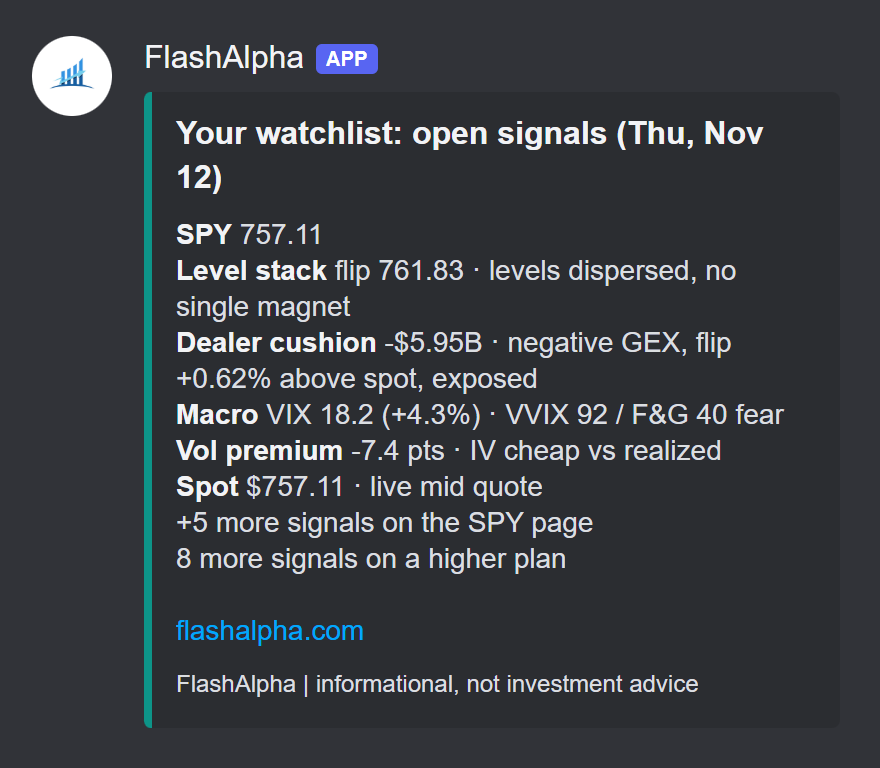
The second message covers the tickers you follow. Each ticker gets its price and up to five signals, with one line that says what the number means: dealer positioning, key levels, the volatility premium and more. A link takes you to the rest of the signals for that ticker.
A watchlist post for SPY on the Free plan.
How many tickers the digest covers depends on your plan:
Plan
Tickers on your watchlist
Free
1
Basic
2
Growth
10
Alpha
100
A new account starts with SPY on its watchlist. With an empty watchlist, the bot posts the market context alone.
Another day's post
The bot writes each post from that morning's volatility data and news, so the content changes every day. This is the post from Thursday, November 12, 2026, the day Nvidia's CEO stepped down. Compare it with the Friday post above: different stories, a different read on volatility and different levels to watch.
FlashAlphaAPP
Market context (Thu, Nov 12)
Volatility is rising again, reversing Wednesday's drop, as Reuters reports a lower open after Nvidia's CEO stepped down. Options are repricing faster than stocks are moving, yet implied vol still trails what the S&P has delivered.
News and market reaction 1. Nvidia CEO Jensen Huang steps down (Reuters, AP News) Nasdaq 100 -0.9% (0.4x a normal day), chip stocks -2.6% (0.6x) Priced in options more than shares. Chips and the Nasdaq are down less than a normal day, yet their implied vol jumped, reversing Wednesday's drop and lifting index volatility.
2. Trump says US needs no Iran deal; tankers disabled in Hormuz (Bloomberg, Reuters) Oil +0.2% (0.1x a normal day), gold -2.3% (1.3x), energy stocks +0.4% (0.2x) Not in spot prices. Crude is quiet and gold is falling, not catching a haven bid. Oil options got pricier, reversing Wednesday, so traders are paying for tail risk.
3. Treasury yields rise and hover at 5% (WSJ, Reuters) Long bonds -0.2% (0.3x a normal day), regional banks -0.4% (0.3x) Only faintly priced. Long bonds are slipping in a quiet session, but their implied vol is rising where it eased Wednesday, a mild support for equity volatility.
Why it isn't lower: SPX dealer gamma flipped back to negative after Wednesday's barely positive reading, and spot sits below the flip on SPX, SPY and QQQ, so hedging flows add to swings. Puts are priced well above calls, VVIX is climbing, and sentiment reads fear.
What to watch: Applied Materials reports today after the close with a 9.9% implied move, down from Wednesday's 10.6%. PPI is out tomorrow at 8:30 AM ET. A move back above the 7619 SPX gamma flip would turn dealer hedging from amplifying to dampening. Reuters reports Trump threatening to double tariffs on Mexico, an unscheduled risk.
FlashAlpha Market Context | FlashAlpha data as of 09:38 ET
The market context post for Thursday, November 12, 2026, as the bot posted it.
Add the bot to your server
You need a FlashAlpha account (the Free plan is enough) and the Manage Webhooks permission on your Discord server.
Step 1: create a webhook in Discord
A webhook is an address that lets an outside service post to one channel. To create one:
In Discord, open your server and choose Server Settings, then Integrations.
Choose Webhooks, then New Webhook.
Pick the channel for the digest. For a digest only you can see, pick a private channel.
Choose Copy Webhook URL.
The address starts with https://discord.com/api/webhooks/. Treat it like a password: anyone who has it can post to that channel.
Step 2: paste the webhook URL into your profile
Sign in to FlashAlpha and open your profile. Choose Discord Bot in the menu on the left.
The Discord Bot tab in the profile.
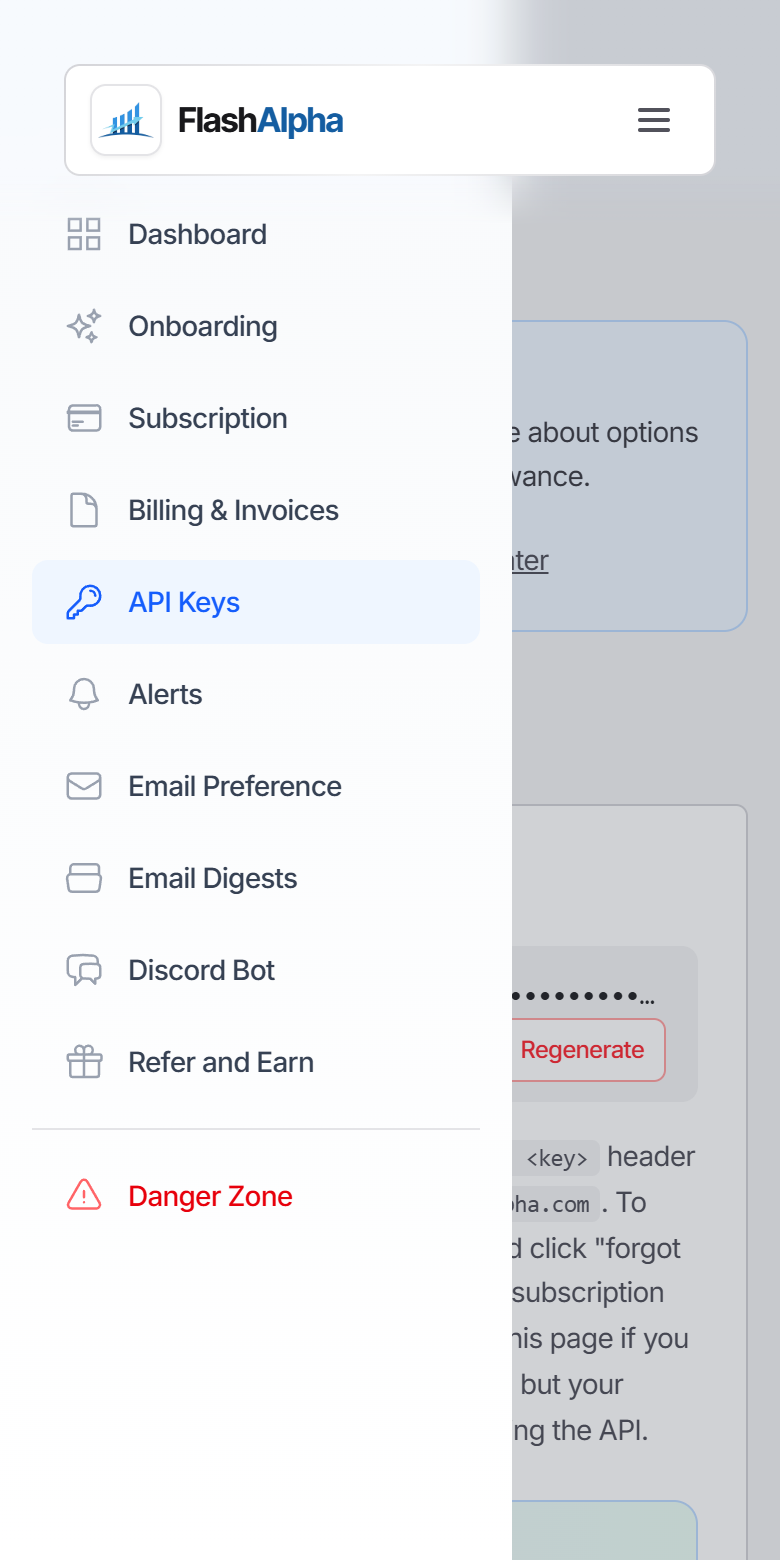
On a phone, open the profile menu first, then choose Discord Bot.
The profile menu on a phone.
Paste the address into the Discord webhook URL field.
The webhook URL pasted in, ready to connect.
Step 3: connect
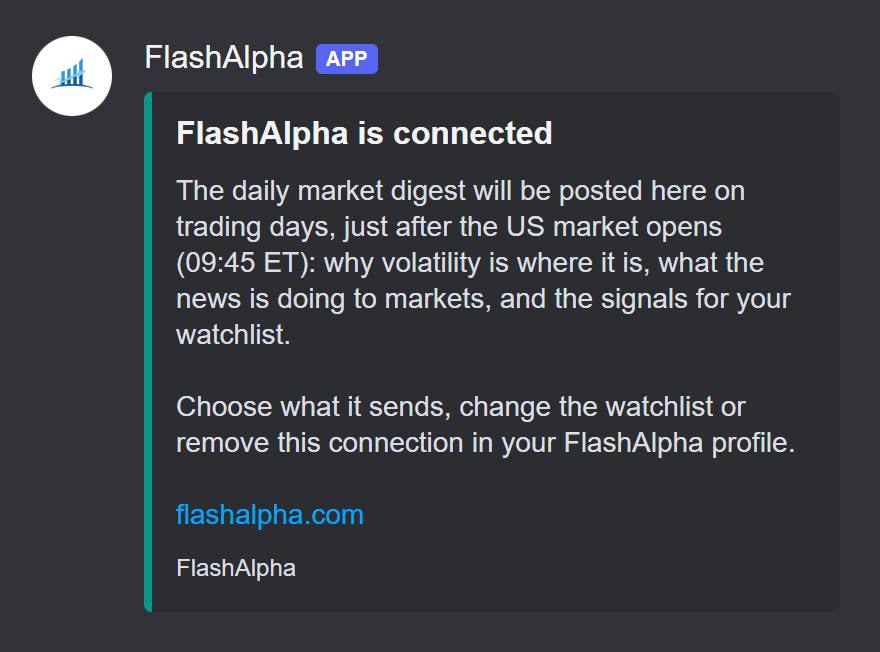
Choose Connect. FlashAlpha posts a short message to your channel to confirm that the address works. The tab then shows the connection, with the address masked.
Connected. The address is shown masked from now on.The confirmation message in your channel.
If the tab says that Discord did not accept the webhook, copy the whole address again from Discord and retry.
That is the whole setup. The first digest arrives at the next 09:45 ET open. Until you change a setting, it has every part and covers the tickers on your watchlist.
Configure the bot
The bot has four settings. A change takes effect at the next digest.
What the bot sends. Any of four parts: volatility, news, why and what to watch, and your watchlist. All four are on until you choose. Choose the parts.
Tickers. The tickers the watchlist part covers, from 1 to 100 by plan. A new account starts with SPY. Choose your tickers.
Channel. The channel is the one you picked when you created the webhook. Move the digest by replacing the webhook.
Connection. Replace the webhook or remove it. Stop the digest at any time.
Choose what the bot sends
Open the Discord Bot tab and use What the bot sends. It lists four parts:
Volatility. The table with one row per measure: VIX and its curve, implied and realized volatility, skew, the expected SPX range, dealer gamma and key levels.
News. Up to three stories that matter for volatility, each with the measured market reaction.
Why and what to watch. Why volatility is where it is, and the events and levels that could change it.
Your watchlist. The second message, with the signals for your tickers.
The bottom line opens the market context whenever you keep one of the first three parts. A change is saved as soon as you make it, and one part always stays on. To stop the digest, remove the webhook.
Preview the message and see earlier posts
The Preview under the list shows the message for your choice, drawn the way Discord shows it. It is built from the most recent market post and your watchlist, so you see real content before the next digest arrives. Below it, Earlier posts holds the market posts of the days before.
News and the watchlist chosen. The preview shows the two messages you get.
You can make the choice before you connect a webhook. It applies to Discord only: the email digest keeps every part.
Choose your tickers
The digest covers the tickers on your watchlist. To change them, open Email Digests in the same menu and edit the list under Tickers. The next digest uses the new list.
The watchlist sits under Email Digests.
Move, stop or protect the connection
These are in the Discord Bot tab too:
Move the digest to another channel. Create a webhook for the new channel, paste it and choose Replace webhook. An account has one webhook at a time.
Stop the digest. Choose Remove. You can also delete the webhook in Discord. FlashAlpha then removes the connection and leaves a note in the tab.
Keep the address private. FlashAlpha stores the address to post the digest and never shows it in full again. If it leaks, delete the webhook in Discord and connect a new one.
Discord and the email digest
The same digest is available by email, up to three times a day: Open at 09:45 ET, Mid at 12:30 ET and Close at 16:15 ET. Discord receives the Open digest. The two are independent, so the Discord digest keeps arriving with the email digest switched off, and the other way round.
Want custom alerts in Discord?
The digest is a fixed daily post. If you want a message at the moment a condition is met, such as a dealer gamma regime flip or a break of a key level, build an alert rule and send it to Discord through a signed webhook. Build a Discord or Slack options alert bot with webhooks covers that path.
Frequently asked questions
Is the FlashAlpha Discord bot free?
Yes. It is included on every plan, the Free plan too.
Do I need to invite a bot to my server?
No. The digest arrives through a Discord webhook that you create. No bot account joins your server, and a webhook can only post to the one channel you picked.
When does it post?
Each US trading day at 09:45 ET, 15 minutes after the open. It does not post on weekends or on US market holidays.
What does it post?
Two messages. The first is the market context: where volatility stands, the news that matters with the measured market reaction, why volatility is where it is, and what to watch. The second is the signals for the tickers on your watchlist.
Can I choose what the bot sends?
Yes. In the Discord Bot tab, under What the bot sends, choose any of four parts: volatility, news, why and what to watch, and your watchlist. A preview shows the message for your choice, and the tab keeps the market posts of the days before.
Can I see what it posts before I connect?
Yes. The Discord Bot tab shows a preview of the message and the market posts of the days before, with or without a webhook.
Does the bot read messages or answer commands?
No. It posts through a webhook, which can only send messages to the one channel you picked. It cannot read your server.
How many tickers can I follow?
One on Free, 2 on Basic, 10 on Growth and 100 on Alpha.
Can I use a private channel?
Yes. The webhook decides the channel. Create the webhook in a private channel and only the members of that channel see the digest.
Does it ping everyone?
No. The posts never mention @everyone, a role or a member.
Can I post the digest to more than one channel?
An account has one webhook at a time. To move the digest, replace the webhook with one for the new channel.
How do I stop it?
Open the Discord Bot tab in your profile and choose Remove, or delete the webhook in Discord.
Do I need the email digest switched on?
No. The Discord digest and the email digest are independent.
Is the digest investment advice?
No. It is market data and context. What you trade is your decision.
The FlashAlpha Discord bot brings the daily market digest to a channel you choose: the market context first, then the signals for your watchlist, each trading day at 09:45 ET. You choose the parts it sends and see the message before it is posted. It is free on every plan and takes three steps to add. Add the Discord bot or see the plans for a longer watchlist.